Friday, February 22, 2019

Magic Cleaner for WhatsApp: A Review and Alternatives 2019

Magic Cleaner for WhatsApp: A Review and Alternatives 2019

Have you ever heard about Magic Cleaner for WhatsApp? Are you curious about how it can do for you? Do you want to know where to download it? You can find the ansers below.
What’s Magic Cleaner for WhatsApp?

Have you ever noticed that WhatsApp likes to hang onto every picture that anyone ever sends you? It might not seem like a couple of little pictures take up much room on your iPhone, but over time all of those images can accumulate and take up precious storage space.

Basically, what Magic Cleaner for WhatsApp does is that it identifies and helps you delete junk images in WhatsApp that you don’t really need. It finds these photos automatically for you, but you can always look them over before you confirm that Magic Cleaner can delete them all for you. It’s very convenient.


Key Features:


It’s a convenient app that you can download straight onto your iPhone.


It will automatically find junk images that you don’t need.


It allows you to remove the images at your discretion.

Basically, it’s a great tool to have if you want to save WhatsApp space on your iPhone.
Test & Review

Magic Cleaner is easy to use and works fairly quickly. It’s also good at finding the photos that you don’t really need, such as the screenshots and memes that are just taking up space in your storage. The interface is easy enough to use, and you can even select junk photos individually to send them to the trash. It was all a very intuitive process that only takes a few taps to accomplish.
Pros:


Easy to use, simple interface.


Automatically choose junk files for you.


Save you space.


Can be used easily right on your iPhone; no need for a computer.
Cons:


The iOS version may be difficult to find, and doesn’t appear to be on the official iTunes store currently.


It is not a security-oriented app, which means that the data you delete will not be permanently deleted. Your photos could still in theory be recovered by special recovery software.
Why Magic Cleaner for WhatsApp is Not the Best Choice

There are several reasons why Magic Cleaner for WhatsApp is not the best choice in cleaners out there, but the primary reason is privacy. If you are deleting photos from WhatsApp, it’s good practice to make sure that the data is scrambled and that your photos are permanently deleted beyond recovery.

Magic Cleaner cannot provide this, which is why a different kind of application that puts more of an emphasis on security would be a better choice. This way, even if you lose your iPhone or give it away, no one will know what data you deleted from WhatsApp.Sponsor ads:

Gihosoft Free iPhone Data Recovery:https://www.gihosoft.com/iphone-data-recovery-free.html

Gihosoft iPhone Data Recovery Free

Free iPhone Data Recovery Software for Windows/Mac

Recover up to 12+ types of files, including contacts, SMS, photos, WhatsApp, Viber, notes, etc.

Restore lost data from iOS devices directly or from iTunes and iCloud backup

Recover iPhone data lost due to iOS upgrade/jailbreak, accidental deletion, device lost or broken

Support all the latest iPhone, iPad and iPod Touch

Both Free and Pro version.

If you lost data after you updated to a new iPhone, you can always use Gihosoft iPhone Data Recovery to get the data back from the old iPhone or backup.You may also like: iphonerecovery.com

If you use android phones, please choose Gihosoft Android Data Recovery.

With Gihosoft Android Data Recovery, no longer afraid of data loss!

Must read:Youtube video downloader for pc

Gihosoft RePicvid Free Photo Recovery Software provides a free photo recovery software for windows to help users recover the deleted or lost photo for free.

Jihosoft Android Data Recovery: the best Android Data Recovery software for Windows and Mac to recover deleted contacts, messages, photos, videos, WhatsApp and etc from Android devices.Tips:How to transfer messages from iPhone to iPhone

jihosoft Free iPhone Data Recovery

Thursday, February 21, 2019

How to Recover SMS from iTunes 2019


2 Restore iPhone from an iTunes Backup

Alternatively, you still could restore the iPhone from an iTunes backup and while you can still get your SMS messages back this way, the method is flawed for the following reasons.

Note


Restoring your device essentially erases the device’s contents and settings and could therefore lead to the loss of new data on the device.


The process takes a very long time, time that you will not be using your device.

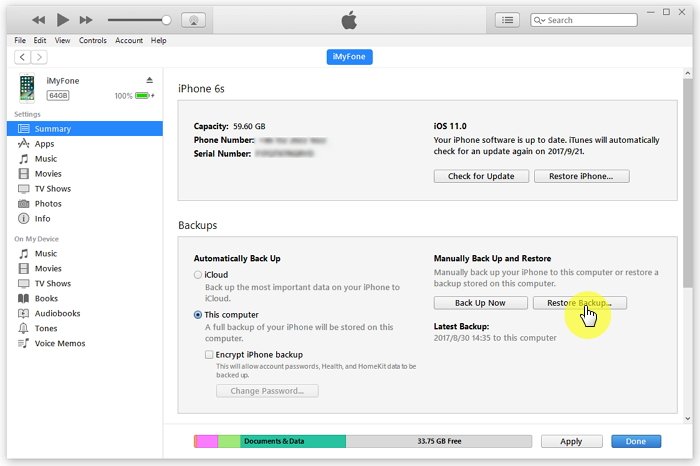
Here’s how to restore your iPhone from an iTunes backup.

Step 1: Launch iTunes on your PC or Mac and connect the device using USB cables. You may see a message requesting your device passcode or to “Trust this Computer.” If you, follow the on-screen instructions.Gihosoft Free iPhone Data Recovery:iphonerecovery.com

Step 2: Once the device is connected and appears in iTunes, select it and then click “Restore Backup.”


Step 3: Select the most relevant backup by date and size and click “Restore.” When requested, enter a password for encrypted backups and wait for the process to be completed. Keep the device connected after it restarts and wait for it to sync with your computer.


Now you can easily recover deleted SMS messages from iTunes. It is clear that D-Back remains the best solution especially because all other data on your device will remain intact after the recovery process.Sponsor ads:

Gihosoft Free iPhone Data Recovery:iphonerecovery.com

Free iPhone Data Recovery Software for Windows/Mac

Recover up to 12+ types of files, including contacts, SMS, photos, WhatsApp, Viber, notes, etc.

Restore lost data from iOS devices directly or from iTunes and iCloud backup

Recover iPhone data lost due to iOS upgrade/jailbreak, accidental deletion, device lost or broken

Support all the latest iPhone, iPad and iPod Touch

Both Free and Pro version.

If you lost data after you updated to a new iPhone, you can always use Gihosoft iPhone Data Recovery to get the data back from the old iPhone or backup.

Top 10 Best FRP Bypass Tools to Bypass Google Account on Android Device 2019

Worth reading:download youtube 1080p

If you use android phones, please choose Gihosoft Android Data Recovery

Jihosoft Android Data Recovery: the best Android Data Recovery software for Windows and Mac to recover deleted contacts, messages, photos, videos, WhatsApp and etc from Android

Wednesday, February 20, 2019

Top 8 Sites for Unique, Creative, Good Kik Name Ideas 2019


1 Top 8 Sites for Unique, Creative, Good Kik Name Ideas
1. Jimpix

If you want to generate a random username, Jimpix is a great site to start. It offers you different Kik usernames in different categories. It also offers a lot of ways to customize the name for perfection. It’s particularly great when you want something inspirational.
2. SpinXO

Don’t have an idea of what you want your Kik username to be. SpinXO will help you by asking you a bunch of questions. Answer about 2 questions and the site will generate random usernames you can choose from.
3. KidPub

This one has 101 set of random names from which you can choose one. But while it does generate cute usernames, the number to choose from is so low, you may end up with a common username. No one wants that, not when you want to stand out.
4. Kik Login Online

Need just a little bit of help? This one gives you 40 cool Kik names to choose from. But before you scoff at the low number, it does have a cool trick. You can rearrange the words to get a totally unique username.
5. Namestation

While they may not have been very creative with their own site name, this one can help you get a few ideas. Even if you don’t use them, you have somewhere to start.
6. Nickname Generator

Of all the one’s we’ve seen this one requires a little bit of a time investment. But it’s all worth it if you want a totally unique name. Answer 15 questions and one will be generated for you.
7. Funny Usernames Discussion from Killermovies

This one is very specific to the type of clientele. Only go here if you are looking to make others laugh every time they see you on Kik. A funny username is one way to remain unforgettable.
8. Good Kik Names Listed by Appamatix

This one has a long list of thousands of Kik usernames for you to choose from. It may have the largest database yet. Go through most to find one that is as creative as you want to be while remaining true to yourself.1 How to Delete Songs from iPhone (only for songs downloadeded from Apple Music)
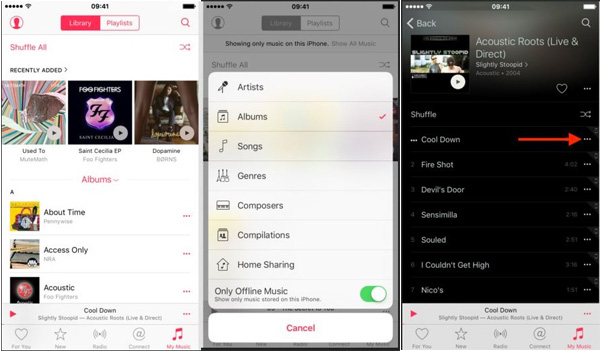
(1) From Music App

Step 1: Launch the Music app and click “My Music” from the bottom.

Step 2: You can list sort your songs by Artists, Albums, Songs, Genres, etc. Turn on “Only Offline Music” and it will only show the downloaded music.

Step 3: Find out the songs you want to delete and you will see More (...) icon beside the songs. Click on it.

Step 4: Choose “Remove Download” option to delete it from your iPhone.


Note: You need to delete songs one by one in this way.
(2) From Settings App - For All Music At Once

If you have lots of music on your iPhone, or you want to the slate clean. Then follow the steps below:

Step 1: Open the Settings app

Step 2: Go to General, then Storage & iCloud Usage and then Manage Storage. Wait for it to load then tap on “Music”.

Step 3: Tap “Edit” in the upper right corner.

Step 4: Tap the red minus button next to All Songs or the specific artist, then tap “Delete”.


Note: You can only delete all songs at once or delete all songs in the same artist once. But you cannot delete some specific songs selectively.Sponsor ads:How to Turn off Tumblr Safe Mode without AccountMust Read:If you lost data after you updated to a new iPhone, you can always use Gihosoft iPhone Data Recovery to get the data back from the old iPhone or backup.

Gihosoft Free iPhone Data Recovery:iphonerecovery.com

If you use android phones, please choose Gihosoft Android Data Recovery

Sponsor ads:

Gihosoft Free iPhone Data Recovery:iphonerecovery.com

Free iPhone Data Recovery Software for Windows/Mac

Recover up to 12+ types of files, including contacts, SMS, photos, WhatsApp, Viber, notes, etc.

Restore lost data from iOS devices directly or from iTunes and iCloud backup

Recover iPhone data lost due to iOS upgrade/jailbreak, accidental deletion, device lost or broken

Support all the latest iPhone, iPad and iPod Touch

Both Free and Pro version.

If you lost data after you updated to a new iPhone, you can always use Gihosoft iPhone Data Recovery to get the data back from the old iPhone or backup.

Top 10 Best FRP Bypass Tools to Bypass Google Account on Android Device 2019

Worth reading:download youtube 1080p

If you use android phones, please choose Gihosoft Android Data Recovery

Jihosoft Android Data Recovery: the best Android Data Recovery software for Windows and Mac to recover deleted contacts, messages, photos, videos, WhatsApp and etc from Android


Monday, February 18, 2019

Resolve Frequent iPad Safari Crashes 2019


2 Update Latest iOS System

Besides the junk files and cache, iPad Safari crash may be result of the old version of your operating system. Thus, one of the solution is to update the latest iOS version. Usually, the iPad will receive notifications when new version is available, accept it whenever you see it or go to Settings > General > Software Update.
3 Clean Safari History & Cookies

Additionally, you can stop Safari crashing on iPad by manually deleting your history and cookies within the software. Go to “Settings > Safari > Clear History and Website Data”.
4 Clear Safari Stored Data

Safari stores data in order to keep running. This data may be a cause for the crashes if it is constantly piled up. To do this the steps are similar as the above mentioned. Go to “Settings > Safari > Advanced > Website Data > Remove All Website Data”.
5 Clear & Disable Autofill

The Autofill can not only cause iPad Safari crashes, but it is also a cause for lags. So, the smartest thing to do is to clear and disable it. You can do this in “Settings > Safari > AutoFill”. You can turn Use Contact Info, Names and Passwords, and credit Cards on or off there. If you disable them, it will not automatically fill out web forms.
6 Disable iCloud Bookmark Syncing

Although you think the iCloud may do you good, it can cause crashes and lags. So, the smartest thing is to disable it too. Go to “Settings > iCloud” and turn off “Safari”. Choose “Delete from My iPhone” then.Bonus Tips:
Restoring Lost Photos and Videos from iPhone

If you have deleted some of your pictures or videos from your gallery, then there is a straightforward way to Recover Deleted Files iPhone back.

After you delete the media files from your gallery, be it photos or videos, then you must know that iOS has a feature that the deleted media files doesn’t get deleted immediately, but it gets compiled to a temporary folder from where it gets deleted after 30 days. If you lost data after you updated to a new iPhone, you can always use Gihosoft iPhone Data Recovery to get the data back from the old iPhone or backup. Should you wish to recover these files, you must go to that “recently deleted” folder and retrieve these files before 30 days.

If you use android phones, please choose Gihosoft Android Data Recovery.

Worth reading:Best youtube downloader online download youtube 1080p

Must Read:

How to transfer messages from iPhone to iPhone

Tips:

How to transfer messages from iPhone to iPhone

Must read:icloud activation lock removal

Must read:Gihosoft Free iPhone Data Recovery:https://www.gihosoft.com/iphone-data-recovery-free.html

Thursday, January 24, 2019

Apple Seeds iOS 12.2, watchOS 5.2, macOS 10.14.4, and tvOS 12.2 Beta 1 to Developers


Following the public launch of iOS 12.1.3 and watchOS 5.1.3 to the public, Apple is moving ahead with new betas.

Apple today officially seeded the first developer beta of both iOS 12.2 and watchOS 5.2. At the time of publication it is not known what is new within the software. However, unlike the previous updates that use minor changes to the version number, the change to “.2” may indicate that Apple is ready to add new forward facing features for the end user this time around. If we discover any new features added, we will update this post accordingly.

To update to iOS 12.2, developers will need to make sure that their supported iOS devices are registered properly. Once that’s done, it’s as simple as opening Settings –> General –> Software Update and then following the onscreen instructions.Must Read:If you lost data after you updated to a new iPhone, you can always use Gihosoft iPhone Data Recovery to get the data back from the old iPhone or backup.

Gihosoft Free iPhone Data Recovery:iphonerecovery.com

to update to watchOS 5.2, developers need to make sure that the Apple Watch is connected to the charger, that the battery has at least 50 percent remaining, and that it is connected and within range of the iPhone. On the iOS device, open the Watch app and tap on Genera –> Software Update.

To update to the latest beta version of tvOS, developers need to run the necessary Xcode profile.

To update to the latest beta version of macOS 10.14.4, developers need to go into System Preferences –> Software Update and follow the onscreen instructions.

It is likely that Apple will also seed a corresponding public beta for the public beta testers as well, which may arrive this week as well.


Like this post? Share it!

Tuesday, January 15, 2019

Reset It When You Are Locked Out of Apple ID


Reset It When You Are Locked Out of Apple ID

There are a few methods for resetting your Apple ID depending on the type of security you chose for your apple account. These methods are as follows:


Two-factor Authentication


Two-step Verification


Email, Password and Security Questions
1 Two-factor Authentication

This requires a trusted Apple device to carry out the reset. If your trusted device is an iPhone,


Launch the “Settings” app.


Tap [your name], then “Password & Security”.


Tap “Change Password” and follow the onscreen steps.
2 Two-step Verification


Go to your Apple ID account page and click "Forgot Apple ID or password."


Enter your Apple ID and select the option to reset your password, then click “Continue”.


If you have forgotten your Apple ID, enter your Recovery Key for two-step verification.


Select a trusted device and a verification code will be sent to you.


Enter the verification code.


Create a new password, then select Reset Password.
3 Email, Password and Security Questions


Go to your Apple ID account page and click "Forgot Apple ID or password."


Enter your Apple ID.


If you have forgotten your Apple ID, select the option to reset your password, then click “Continue”.


How do you want to reset your password?


For security questions, select "Answer security questions" and follow the rest of the steps.


For email, select "Get an email". An email will be sent to your primary or rescue email address.


If you did not get an email and you are asked for a Recovery Key, two-factor authentication or two-step verification should be used.


It is advisable to always choose passwords that cannot be easily guessed by unauthorized folks but at the same time, easy to remember. However, if you have issues with your Apple ID, you can always gain access back into your device through the information provided in this article.

Sponsor ads:

Gihosoft Free iPhone Data Recovery:https://www.gihosoft.com/iphone-data-recovery-free.html

Gihosoft iPhone Data Recovery Free

Free iPhone Data Recovery Software for Windows/Mac

Recover up to 12+ types of files, including contacts, SMS, photos, WhatsApp, Viber, notes, etc.

Restore lost data from iOS devices directly or from iTunes and iCloud backup

Recover iPhone data lost due to iOS upgrade/jailbreak, accidental deletion, device lost or broken

Support all the latest iPhone, iPad and iPod Touch

Both Free and Pro version.

If you lost data after you updated to a new iPhone, you can always use Gihosoft iPhone Data Recovery to get the data back from the old iPhone or backup.You may also like: iphonerecovery.com

If you use android phones, please choose Gihosoft Android Data Recovery.

With Gihosoft Android Data Recovery, no longer afraid of data loss!

Must read:Youtube video downloader for pc

Gihosoft RePicvid Free Photo Recovery Software provides a free photo recovery software for windows to help users recover the deleted or lost photo for free.

Jihosoft Android Data Recovery: the best Android Data Recovery software for Windows and Mac to recover deleted contacts, messages, photos, videos, WhatsApp and etc from Android devices.Tips:How to transfer messages from iPhone to iPhone

jihosoft Free iPhone Data Recovery

Sunday, January 13, 2019

2019 iPhones May Support Wi-Fi 6


Apple’s newest iPhones, which are expected to launch later this year, are already rumored to feature quite a few noteworthy changes.

And now one analyst has weighed in on the subject, saying that he believes Apple will include the Wi-Fi 6 standard for its upcoming lineup. This is from analyst Blaine Curtis of Barclays, and the comment came during a CES wrap-up. Unfortunately, that’s all we have to go on here, as there isn’t much in the way of additional information.

Wi-Fi 6 is also known as 802.11ax. It’s meant to replace the current 802.11ac standard, and should be finalized sometime this year. When it is finalized and out there in the real world, Wi-Fi 6 (which will be the public name, in an effort to reduce confusion from this point on), it will offer higher capacity, better power efficiency in devices, overall better performance in congested environments, and higher data rates, among other improvements.

The inclusion of faster and more stable Wi-Fi certainly makes sense across the board as an important addition for a smartphone launching in 2019, and Apple hasn’t been shy about early adopting these technologies in the iPhone. Moreover, the fact that Apple is expected not to launch a 5G-capable iPhone until 2020, which can tap into faster mobile network data speeds, this may be one element that helps set the iPhone apart from other devices launched later this year.

Earlier today we heard that the flagship 2019 iPhone is going to adopt a triple camera design on its back, and that the iPhone XR is going to get a dual camera as well.

Like this post? Share it!Sponsor ads:

Gihosoft Free iPhone Data Recovery:https://www.gihosoft.com/iphone-data-recovery-free.html

Gihosoft iPhone Data Recovery Free

Free iPhone Data Recovery Software for Windows/Mac

Recover up to 12+ types of files, including contacts, SMS, photos, WhatsApp, Viber, notes, etc.

Restore lost data from iOS devices directly or from iTunes and iCloud backup

Recover iPhone data lost due to iOS upgrade/jailbreak, accidental deletion, device lost or broken

Support all the latest iPhone, iPad and iPod Touch

Both Free and Pro version.

If you lost data after you updated to a new iPhone, you can always use Gihosoft iPhone Data Recovery to get the data back from the old iPhone or backup.You may also like: iphonerecovery.com

If you use android phones, please choose Gihosoft Android Data Recovery.

With Gihosoft Android Data Recovery, no longer afraid of data loss!

Must read:Youtube video downloader for pc

Gihosoft RePicvid Free Photo Recovery Software provides a free photo recovery software for windows to help users recover the deleted or lost photo for free.

Jihosoft Android Data Recovery: the best Android Data Recovery software for Windows and Mac to recover deleted contacts, messages, photos, videos, WhatsApp and etc from Android devices.Tips:How to transfer messages from iPhone to iPhone
jihosoft Free iPhone Data Recovery

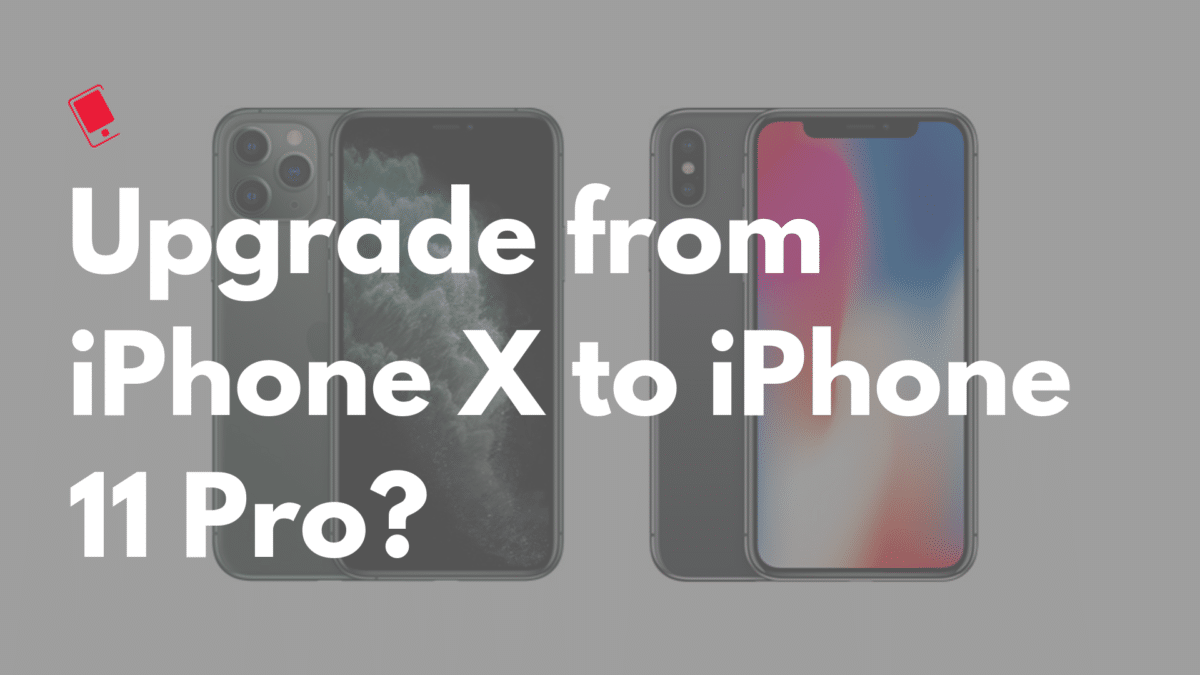
Should You Upgrade from iPhone X to iPhone 11 Pro?

Now that the iPhone 11 Pro is out, many iPhone X owners are wondering if they should upgrade to it or not. If you are in a similar dilemm...