Factory Reset
The easiest way to get rid of the virus is to factory reset your iPhone. Factory resetting will remove all your data, including the virus from your device. Although it is an effective way to get rid of the virus, it should be done as a last resort because your data is wiped in this method and without a backup, you won't be able to restore it. Follow these instructions to reset your iPhone:Sponsor Ads:
Gihosoft iPhone Data Recovery is a professional iPhone Data Recovery software to get back all your lost text message, photo, video, call history, note, contact and more from iPhone/iPad/iPod Touch. It offers a full solution to recover your lost data in different tough situations. Besides recovering data directly from iPhone, iPad and iPod touch, it also allows you to recover data from iCloud and iTunes backup files.
Open Settings app.
Navigate to Settings > General > Reset.
Select Erase All Contents and Settings and then input your passcode to start the reset process.

Clear History and Website Data
Increased pop-up ads is a symptom of virus in your iPhone. If you are being redirected to other pages and seeing a lot of pop-ups lately on your Safari browser, then it may be due to the presence of the virus or malware. In this case, it is recommended that you clear history and website data from the browser to remove virus from iPhone. Follow these instructions to clear history and website data:
Open Settings app.
Navigate to Safari > Clear History and Website Data.
Then select Clear History and Data to confirm your action.

Power Off and Restart
Sometimes restarting the device is enough to clear the RAM of your device and stop the unwanted background processes, including the virus. Follow these instructions to restart your iPhone:
Press the power button of your iPhone until the screen changes. You will see a slider on the screen prompting ‘slide to power off'.
Now use the slider to power the iPhone down.
Once it is completely switched off. Use the power button to boot the device.

Delete App Suspected of Containing the Malware
Most viruses spread through third-party apps in your iPhone. If you suspect an app misbehaving lately e.g. it is taking a lot more resources than usual, increasing your data usage drastically, or causing battery drain, etc., then it might be because the app is infected with malware. In this case, it is recommended that you delete/uninstall that app from your iPhone.
Restore Your iPhone from a Recent Backup
If you back up your iPhone regularly, then it will be quite easy for you to get rid of the virus on iPhone. You simply need to restore your iPhone to the most recent backup that doesn't contain the virus. If restoring the backup does not remove the virus, then it means your iPhone was infected at the time of creating that backup. In that case, you will need to restore from the second most recent backup. You will need to use iTunes for this purpose.
Step 1. Connect your iPhone to computer and launch iTunes.
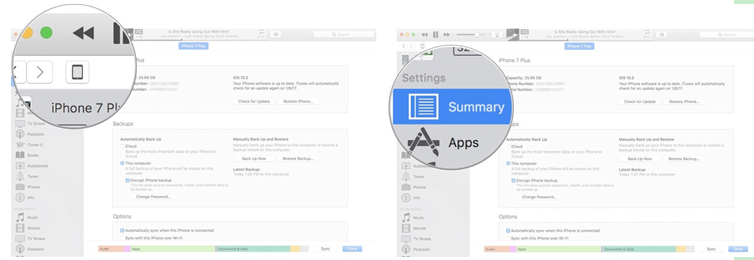
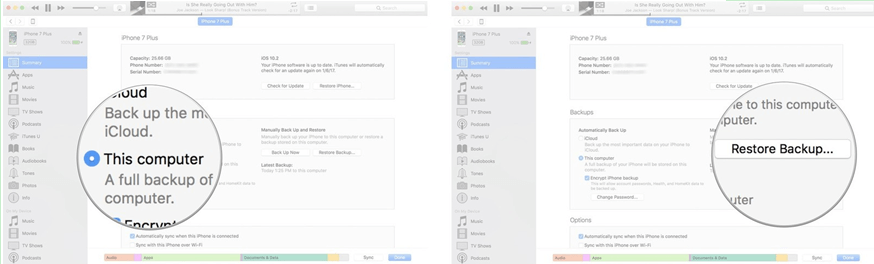
Step 2. Select This computer and click on Restore Backup.
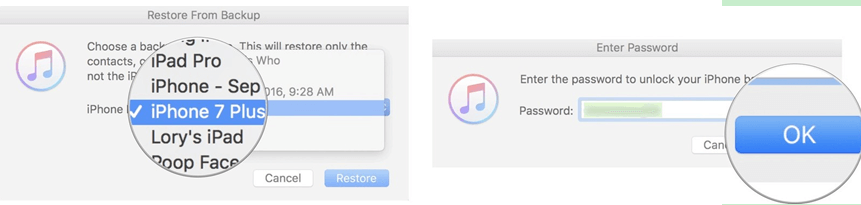
Step 3. Then choose a backup and click on Restore.
Upgrade iOS
Firmware updates bring security patches that protect the device from virus or malware attacks. If you haven't upgraded your iPhone's firmware in a while, then your device may be vulnerable to malware attacks. Upgrading your iPhone will help you remove the virus from your iPhone and also protect your device from future malware attacks.
Open Settings app on your iPhone.
Click on General > Software Update > Install Now.

Un-jailbreak an iPhone
Jailbroken iPhone can be installed with apps from various dubious sources. This makes the jailbroken iPhone more vulnerable to viruses or malware. If your iPhone is jailbroken, then it is recommended that you un-jailbreak it to protect it from viruses.
Gihosoft Free Android Data Recovery can help you easily recover lost data such as photos, videos, contacts, text messages, WhatsApp & Viber chats from Google Pixel/XL or other Android phones effortlessly.
 If you lost videos from iOS Camerall Roll which are nowhere to download again, you can use Gihosoft iPhone Data Recovery to get back deleted videos from iOS device including iPhone, iPad and iPod Touch.